
Introduction
Do you manage BIM projects? Do you have responsibility for implementing BIM in your business? Can you generate a detailed report for your management team of your current organisational BIM strengths and weaknesses? How does your firm compare to your peers in the wider AEC Industry?
To comply with PAS91, how do you assess BIM training and skills? How do you demonstrate on your PQQ that you have all the necessary metrics in place?
This comprehensive library of skills assessments will empower your organisation to capture helpful, relevant and accurate metrics, to better demonstrate individual and organisational BIM capability. The results data and gap analysis will also inform your training and hiring plans, so you can continuously improve your performance in this business-critical area.
BIM Management and Process
BIM01_UK BIM Level 2 Awareness
The foundation-level knowledge required by everyone involved with BIM in your organisation.
Understand the implications and value proposition of BIM. Understand the implications and value proposition of BIM within your organisation.
Modules include: What is BIM?, BS1192, PAS1192-2, PAS1192-3, PAS1192-2-EIR, CIC BIM Protocol, RIBA-Plan of Works.
BIM02_UK BIM Level 2 Management Fundamentals
Understand the implications and value proposition of BIM within your organisation.
Understand the requirement for the management and exchange of information between supply chain members and clients as described in the 1192 suite of standards and PAS55 / ISO 55000.
Modules include: Project Start-up Requirements, PAS1192-2-BEP, BS1192-CDE, BS1192-Container Naming, PAS1192-Roles, BS1192-4, PAS1192-5, Government Soft Landings.
BIM03_UK BIM Level 2 Learning Outcomes Framework
Understand the requirement for the management and exchange of information between supply chain members and clients as described in the 1192 suite of standards and PAS55 / ISO 55000.
Understand what BIM is, the contextual requirement for BIM Level 2 and its connection to the Government Construction Strategy and Industrial Strategy 2025.
Topics include: UK Govt BIM L2 LOF Part 1, UK Govt BIM L2 LOF Part 2, UK Govt BIM L2 LOF Part 3.
BIM04_Practical BIM Fundamentals
This assessment looks at knowledge of a range of general BIM management tasks, including; General BIM Principles, Implementation, Modelling, Information Exchange and Project Coordination.
BIM05A_BIM Authoring with AECOsim (Fundamentals)
This assessment for Information Originators looks at basic concepts of BIM authoring and knowledge of the DPSM (Digital Production Standards Manual), for firms using Bentley AECOsim. Topics include: Purpose, Documents, Coordinates, Parameters, Validation, Model Types, File Naming, Layer Naming and Drawing Coordination.
BIM05R_BIM Authoring with Revit (Fundamentals)
This assessment for Information Originators looks at basic concepts of BIM authoring and knowledge of the DPSM (Digital Production Standards Manual), for firms using Autodesk Revit. Topics include: Purpose, Documents, Coordinates, Parameters, Validation, Model Types, File Naming, Layer Naming and Drawing Coordination.
BIM06A_BIM Authoring with AECOsim (Advanced)
This assessment for Information Originators looks at more advanced concepts of BIM authoring and knowledge of the DPSM (Digital Production Standards Manual), for firms using Bentley AECOsim. Topics include: Project Setup, Compound Cells, Project Items, IFC Import, IFC Export, IFC Modelling, IFC Validation.
BIM06R_BIM Authoring with Revit (Advanced)
This assessment for Information Originators looks at more advanced concepts of BIM authoring and knowledge of the DPSM (Digital Production Standards Manual), for firms using Autodesk Revit. Topics include: Project Setup, System Family, IFC Import, IFC Export, IFC Modelling, IFC Validation.
BIM07A_BIM Software Management (AECOsim)
This assessment for Task Information Management (Reviewers) looks at basic concepts of BIM Software Management, for firms using Bentley AECOsim. Topics include: Uniclass1.4 / Uniclass 2015, Information Validation, Project Review.
BIM07R_BIM Software Management (Revit)
This assessment for Task Information Management (Reviewers) looks at basic concepts of BIM Software Management, for firms using Autodesk Revit. Topics include: Uniclass1.4 / Uniclass 2015, Information Validation, Project Review.
BIM08R_BIM Coordination (Revit)
This assessment for BIM Coordinators looks at basic concepts of BIM Software Coordination, for firms using Autodesk Revit. Topics include: Revit Configuration, Project Resources, Parameters, View Templates, Family Editor.
Project Process (Revit)
This assessment for BIM Coordinators and Managers looks at the impact of using Autodesk Revit in a Project environment. Topics include: Views, Families, Worksharing and Schedules. Sample data sets for the task based questions are based on Revit Architecture.
BIM Software
AutoCAD Civil 3D Fundamentals
This online skills assessment covers a selection of core AutoCAD Civil 3D skills. The content is split into 4 parts, as follows:
Part 1: Surfaces, Alignments and Profiles
Part 2: Corridors, Sections and Parcels
Part 3: Pipe Networks, Grading and Finalizing a Project
Part 4: User Interface, Civil 3D Environment and Survey Tools
AutoCAD Civil 3D – Xpress
A short skills assessment for AutoCAD Civil 3D, designed for interviews. This assessment comprises questions covering a range of basic AutoCAD Civil 3D skills.
AutoCAD Civil 3D Road Design (Advanced)
Web based skills test for more experienced users of AutoCAD Civil 3D, with a particular focus on Roadway Design.
InfraWorks 360
Detailed skills assessment and training needs analysis for InfraWorks 360.
This assessment comprises questions covering a range of basic InfraWorks 360 skills, relating to Importing, Data, Options, Styles, Exploring models, Menus, Themes, Objects and Measuring.
Revit Architecture Fundamentals
This test comprises questions covering a range of basic Revit Architecture skills, including: Basic Element Creation; Views & Sheets; Detailing; Keynotes & Annotation; Worksharing; Dimensions & Rules; Interoperability; Families & Parts; Scheduling; Coordinates & Orientation; Output.
Revit Architecture Xpress
A short skills assessment for Revit Architecture, designed for interviews. This assessment comprises questions covering a range of basic Revit Architecture skills. Modules covered include; Basic Element Creation; Views & Sheets; Detailing; Keynoting & Annotation; Worksharing; Dimensions & Rules; Interoperability; Families & Parts; Scheduling; Coordinates & Orientation; Output.
Revit Architecture Occasional
Skills assessment and training needs analysis for casual/novice users of Revit Architecture. This test comprises questions covering a range of basic Revit skills. Modules covered include; Navigation, Views & Sheets, Measuring, Exporting Data, Families, Element Selection.
Revit Architecture Advanced
Detailed skills assessment and training needs analysis for Revit Architecture. This test comprises questions covering a range of advanced Revit skills.
Revit Content Creation
This assessment looks at Content Creation and Families in Revit. Sample data sets for the task based questions are based on Revit Architecture.
Revit Architecture for Interiors
A short skills assessment for Revit Architecture, as it is applied to the Interiors discipline. This assessment comprises questions covering a range of basic Revit skills.
Revit MEP Fundamentals (Mechanical)
Detailed skills assessment and training needs analysis for Revit MEP, as it is applied to the Mechanical discipline.
Revit MEP Fundamentals (Electrical)
Skills gap assessment and staff training needs analysis for Revit MEP, as it is applied to the Electrical discipline.
Revit MEP Fundamentals (Plumbing)
Online skills assessments and gap analysis tests for Revit MEP, as it applies to the Plumbing discipline.
Revit MEP Xpress
A short skills assessment for Revit MEP, designed for interviews. This assessment comprises questions covering a range of basic Revit MEP skills, across all disciplines.
Revit MEP Advanced
These assessments comprise questions covering a range of advanced Revit MEP (Mechanical and Plumbing) skills.
Revit Structure Fundamentals
Detailed skills assessment and skills gap analysis for Revit Structure, covering a variety of core skills, including: The Project Environment; Creating the Model; Editing the Model; Detailing the Model; Documenting the Model.
Revit Structure Xpress
A short skills assessment for Revit Structure, designed for interviews. This assessment comprises questions covering a range of basic Revit Structure skills. Modules covered include; The Project Environment; Creating the Model; Editing the Model; Detailing the Model; Documenting the Model.
Revit Structure Advanced
Skills gap assessment and staff training needs analysis for more experienced users of Revit Structure.
BIM 360 Glue fundamentals
Skills assessment and training needs analysis for BIM 360 Glue. This test comprises questions covering a range of basic BIM 360 Glue skills, including: Objects, Clashes, Administration, Model Management and General Operation.
Navisworks Manage fundamentals
This test comprises questions covering a range of basic Navisworks skills, including: Quantification, Rendering, TimeLiner, Appearance Profiler, Clash Detective, User Interface, File Formats, Measuring and Operations.
Vault fundamentals
This test comprises questions covering a range of basic Vault skills, including: File Details, Version History, File Check Out, File Relationships, Searching, Saving, Working Folders, Opening Files.
Solibri fundamentals
This test comprises questions covering a range of basic Solibri Model Checker skills, including: User Interface, Model Review & Annotation, Data Interrogation, Model Checking, Model Comparison.
Bentley AECOsim Building Designer fundamentals (Architectural)
This test comprises questions covering a range of basic AECOsim Building Designer skills, including: Families and Parts, Element Creation, Element Modification, DataGroups, Annotation, Drawings, Data Exchange, Setting Out, Scheduling (Output), Spaces.
Bentley AECOsim Building Designer fundamentals (Structural)
This test comprises questions covering a range of basic AECOsim Building Designer skills, including: Families & Parts, Setting Out, Data Exchange, DataGroups, Element Creation, Element Modify, Annotation, Drawings & Views, Scheduling.
Graphisoft ArchiCAD fundamentals (Parts 1-4)
This test comprises questions covering a range of ArchiCAD skills, including: User Interface, Navigation & Workflow, General Drafting, General Modelling, Model Management, Printing & Plotting.
Capture helpful, relevant and accurate metrics to demonstrate individual and organisational BIM capability. Use results and gap analysis data to inform training and hiring plans, with the aim of continuously improving performance in this business-critical area.
If you would like to find out more about our suite of BIM assessments, please get in touch.
"This suite of educational resources and assessment material from KnowledgeSmart is World Class and an essential resource for any AEC business that is serious about upskilling their team's BIM knowledge and practical capability. Most firms claim to have the ability to deliver projects to BIM Level 2, but how many really know where their strengths and weaknesses lie? Now, there can be no excuses. Capturing performance metrics and measuring staff capability should be a mandatory part of every BIM deliverable."
Global BIM Lead, Top 20 UK Multidisciplinary Firm
R
Showing posts with label Bentley Systems. Show all posts
Showing posts with label Bentley Systems. Show all posts
Thursday, 21 September 2017

Thursday, 16 February 2017
Case Study - Skills Assessment at David Morley Architects
David Morley Architects has partnered with KnowledgeSmart and Evolve Consultancy to identify gaps in its team’s CAD and BIM expertise and provide the targeted training needed to raise benchmarks across the firm.
Click here for a detailed case study, recently published in AEC Magazine, about the benefits of an enlightened, forward-thinking, process-driven, tech-savvy, BIM-capable business.
This case study looks in detail at skills assessment, benchmarking, technology, data, metrics, relevant consultancy and focused training. An excellent example of good practice in the AEC industry.
R
Click here for a detailed case study, recently published in AEC Magazine, about the benefits of an enlightened, forward-thinking, process-driven, tech-savvy, BIM-capable business.
This case study looks in detail at skills assessment, benchmarking, technology, data, metrics, relevant consultancy and focused training. An excellent example of good practice in the AEC industry.
R
Saturday, 27 February 2016
How Good Are Architects at Using MicroStation?
Architects around the world have been using 2D draughting tools on live projects for over 20 years. One of the most popular applications for design firms is Bentley Systems' MicroStation platform.
In recent years, KnowledgeSmart's online skills assessment software platform has captured test scores from thousands of Architects, representing hundreds of design firms, spread across six continents and a couple of dozen countries.
We have analysed the results data generated from these live assessments, at a basic skills level, and noted the following trends. For this particular study, the majority of our data is generated in the UK, USA, Australia and Canada (in that order).
A simple key to interpret the data below:
Architect = Job Title
MicroStation = MicroStation 2D skills
1 to 5 = 1 to 5 years' experience using the tool
6 to 10 = 6 to 10 years' experience using the tool
11 to 15 = 11 to 15 years' experience using the tool
Regular = use the tool daily (or almost daily)
Occasional = use the tool weekly (or less than weekly)
Self taught = learned to use the tool primarily 'on the job'
Formal = learned to the tool primarily via formal classroom or online training
All = overall KS benchmark data
AUS = Australia
CAN = Canada
UK = UK
USA = USA
Here is a summary of the results presented by different types of Architects.
Overall
MicroStation score overall: 59.3% in 5040 secs
Architect/MicroStation/1 to 5/regular/self taught/all = 53.8% in 5249 secs
Architect/MicroStation/1 to 5/regular/formal/all = 53.1% in 5131 secs
Architect/MicroStation/6 to 10/regular/self taught/all = 60.4% in 4974 secs
Architect/MicroStation/6 to 10/regular/formal/all = 59.9% in 4854 secs
Architect/MicroStation/11 to 15/regular/self taught/all = 59.7% in 4824 secs
Architect/MicroStation/11 to 15/regular/formal/all = 59.3% in 4754 secs
Architect/MicroStation/1 to 5/occasional/self taught/all = 49.5% in 5657 secs
Architect/MicroStation/1 to 5/occasional/formal/all = 48.8% in 5520 secs
Architect/MicroStation/6 to 10/occasional/self taught/all = 55.3% in 5309 secs
Architect/MicroStation/6 to 10/occasional/formal/all = 55.2% in 5267 secs
Architect/MicroStation/11 to 15/occasional/self taught/all = 55.8% in 5278 secs
Architect/MicroStation/11 to 15/occasional/formal/all = 55.1% in 5222 secs
Australia
MicroStation score Australia: 58.7% in 4873 secs
Architect/MicroStation/1 to 5/regular/self taught/AUS = 53.6% in 5201 secs
Architect/MicroStation/1 to 5/regular/formal/AUS = 53.0% in 5160 secs
Architect/MicroStation/6 to 10/regular/self taught/AUS = 59.2% in 4954 secs
Architect/MicroStation/6 to 10/regular/formal/AUS = 58.8% in 4889 secs
Architect/MicroStation/11 to 15/regular/self taught/AUS = 58.8% in 4876 secs
Architect/MicroStation/11 to 15/regular/formal/AUS = 58.2% in 4565 secs
Architect/MicroStation/1 to 5/occasional/self taught/AUS = 48.1% in 5595 secs
Architect/MicroStation/1 to 5/occasional/formal/AUS = 47.3% in 5476 secs
Architect/MicroStation/6 to 10/occasional/self taught/AUS = 54.9% in 5212 secs
Architect/MicroStation/6 to 10/occasional/formal/AUS = 54.2% in 5131 secs
Architect/MicroStation/11 to 15/occasional/self taught/AUS = 55.2% in 5152 secs
Architect/MicroStation/11 to 15/occasional/formal/AUS = 54.4% in 5059 secs
Canada
MicroStation score Canada: 57.7% in 5172 secs
Architect/MicroStation/1 to 5/regular/self taught/CAN = 52.7% in 5421 secs
Architect/MicroStation/1 to 5/regular/formal/CAN = 52.6% in 5387 secs
Architect/MicroStation/6 to 10/regular/self taught/CAN = 58.2% in 5178 secs
Architect/MicroStation/6 to 10/regular/formal/CAN = 57.8% in 5102 secs
Architect/MicroStation/11 to 15/regular/self taught/CAN = 58.3% in 5046 secs
Architect/MicroStation/11 to 15/regular/formal/CAN = 57.6% in 5012 secs
Architect/MicroStation/1 to 5/occasional/self taught/CAN = 47.4% in 5754 secs
Architect/MicroStation/1 to 5/occasional/formal/CAN = 46.8% in 5632 secs
Architect/MicroStation/6 to 10/occasional/self taught/CAN = 54.6% in 5512 secs
Architect/MicroStation/6 to 10/occasional/formal/CAN = 53.8% in 5466 secs
Architect/MicroStation/11 to 15/occasional/self taught/CAN = 55.1% in 5432 secs
Architect/MicroStation/11 to 15/occasional/formal/CAN = 54.7% in 5313 secs
UK
MicroStation score UK: 61.3% in 4859 secs
Architect/MicroStation/1 to 5/regular/self taught/UK = 55.5% in 5285 secs
Architect/MicroStation/1 to 5/regular/formal/UK = 55.1% in 5222 secs
Architect/MicroStation/6 to 10/regular/self taught/UK = 61.5% in 4862 secs
Architect/MicroStation/6 to 10/regular/formal/UK = 61.1% in 4828 secs
Architect/MicroStation/11 to 15/regular/self taught/UK = 61.3% in 4901 secs
Architect/MicroStation/11 to 15/regular/formal/UK = 60.8% in 4788 secs
Architect/MicroStation/1 to 5/occasional/self taught/UK = 49.7% in 5456 secs
Architect/MicroStation/1 to 5/occasional/formal/UK = 49.1% in 5402 secs
Architect/MicroStation/6 to 10/occasional/self taught/UK = 56.3% in 5232 secs
Architect/MicroStation/6 to 10/occasional/formal/UK = 55.6% in 5179 secs
Architect/MicroStation/11 to 15/occasional/self taught/UK = 56.7% in 5143 secs
Architect/MicroStation/11 to 15/occasional/formal/UK = 55.8% in 5056 secs
USA
MicroStation score USA: 59.2% in 5374 secs
Architect/MicroStation/1 to 5/regular/self taught/US = 54.2% in 5767 secs
Architect/MicroStation/1 to 5/regular/formal/US = 53.6% in 5647 secs
Architect/MicroStation/6 to 10/regular/self taught/US = 59.6% in 5387 secs
Architect/MicroStation/6 to 10/regular/formal/US = 59.2 in 5322 secs
Architect/MicroStation/11 to 15/regular/self taught/US = 59.5% in 5278 secs
Architect/MicroStation/11 to 15/regular/formal/US = 59.2% in 5166 secs
Architect/MicroStation/1 to 5/occasional/self taught/US = 48.4% in 5767 secs
Architect/MicroStation/1 to 5/occasional/formal/US = 47.7% in 5665 secs
Architect/MicroStation/6 to 10/occasional/self taught/US = 55.1% in 5489 secs
Architect/MicroStation/6 to 10/occasional/formal/US = 54.8% in 5447 secs
Architect/MicroStation/11 to 15/occasional/self taught/US = 55.6% in 5420 secs
Architect/MicroStation/11 to 15/occasional/formal/US = 55.1% in 5391 secs
Observations
All four territories in this study are mature markets, in terms of MicroStation adoption.
Each country is an established Bentley Systems' market, with a high quality learning and development environment and vendor consultancy support.
Each country is well supported by professional bodies, AEC industry conferences and established vendor user community groups and online resources.
Overall, regular users are more accurate and faster than part-time users.
Architects with 6 to 10 years' of experience with these tools are the most efficient. They reach a plateau in performance after c. 7 years and make no further productivity gains.
Architects who learn to apply these tools on projects are more accurate than those who have primarily formal training, but less practical experience. Formally trained users are faster overall than self-taught users.
R
In recent years, KnowledgeSmart's online skills assessment software platform has captured test scores from thousands of Architects, representing hundreds of design firms, spread across six continents and a couple of dozen countries.
We have analysed the results data generated from these live assessments, at a basic skills level, and noted the following trends. For this particular study, the majority of our data is generated in the UK, USA, Australia and Canada (in that order).
A simple key to interpret the data below:
Architect = Job Title
MicroStation = MicroStation 2D skills
1 to 5 = 1 to 5 years' experience using the tool
6 to 10 = 6 to 10 years' experience using the tool
11 to 15 = 11 to 15 years' experience using the tool
Regular = use the tool daily (or almost daily)
Occasional = use the tool weekly (or less than weekly)
Self taught = learned to use the tool primarily 'on the job'
Formal = learned to the tool primarily via formal classroom or online training
All = overall KS benchmark data
AUS = Australia
CAN = Canada
UK = UK
USA = USA
Here is a summary of the results presented by different types of Architects.
Overall
MicroStation score overall: 59.3% in 5040 secs
Architect/MicroStation/1 to 5/regular/self taught/all = 53.8% in 5249 secs
Architect/MicroStation/1 to 5/regular/formal/all = 53.1% in 5131 secs
Architect/MicroStation/6 to 10/regular/self taught/all = 60.4% in 4974 secs
Architect/MicroStation/6 to 10/regular/formal/all = 59.9% in 4854 secs
Architect/MicroStation/11 to 15/regular/self taught/all = 59.7% in 4824 secs
Architect/MicroStation/11 to 15/regular/formal/all = 59.3% in 4754 secs
Architect/MicroStation/1 to 5/occasional/self taught/all = 49.5% in 5657 secs
Architect/MicroStation/1 to 5/occasional/formal/all = 48.8% in 5520 secs
Architect/MicroStation/6 to 10/occasional/self taught/all = 55.3% in 5309 secs
Architect/MicroStation/6 to 10/occasional/formal/all = 55.2% in 5267 secs
Architect/MicroStation/11 to 15/occasional/self taught/all = 55.8% in 5278 secs
Architect/MicroStation/11 to 15/occasional/formal/all = 55.1% in 5222 secs
Australia
MicroStation score Australia: 58.7% in 4873 secs
Architect/MicroStation/1 to 5/regular/self taught/AUS = 53.6% in 5201 secs
Architect/MicroStation/1 to 5/regular/formal/AUS = 53.0% in 5160 secs
Architect/MicroStation/6 to 10/regular/self taught/AUS = 59.2% in 4954 secs
Architect/MicroStation/6 to 10/regular/formal/AUS = 58.8% in 4889 secs
Architect/MicroStation/11 to 15/regular/self taught/AUS = 58.8% in 4876 secs
Architect/MicroStation/11 to 15/regular/formal/AUS = 58.2% in 4565 secs
Architect/MicroStation/1 to 5/occasional/self taught/AUS = 48.1% in 5595 secs
Architect/MicroStation/1 to 5/occasional/formal/AUS = 47.3% in 5476 secs
Architect/MicroStation/6 to 10/occasional/self taught/AUS = 54.9% in 5212 secs
Architect/MicroStation/6 to 10/occasional/formal/AUS = 54.2% in 5131 secs
Architect/MicroStation/11 to 15/occasional/self taught/AUS = 55.2% in 5152 secs
Architect/MicroStation/11 to 15/occasional/formal/AUS = 54.4% in 5059 secs
Canada
MicroStation score Canada: 57.7% in 5172 secs
Architect/MicroStation/1 to 5/regular/self taught/CAN = 52.7% in 5421 secs
Architect/MicroStation/1 to 5/regular/formal/CAN = 52.6% in 5387 secs
Architect/MicroStation/6 to 10/regular/self taught/CAN = 58.2% in 5178 secs
Architect/MicroStation/6 to 10/regular/formal/CAN = 57.8% in 5102 secs
Architect/MicroStation/11 to 15/regular/self taught/CAN = 58.3% in 5046 secs
Architect/MicroStation/11 to 15/regular/formal/CAN = 57.6% in 5012 secs
Architect/MicroStation/1 to 5/occasional/self taught/CAN = 47.4% in 5754 secs
Architect/MicroStation/1 to 5/occasional/formal/CAN = 46.8% in 5632 secs
Architect/MicroStation/6 to 10/occasional/self taught/CAN = 54.6% in 5512 secs
Architect/MicroStation/6 to 10/occasional/formal/CAN = 53.8% in 5466 secs
Architect/MicroStation/11 to 15/occasional/self taught/CAN = 55.1% in 5432 secs
Architect/MicroStation/11 to 15/occasional/formal/CAN = 54.7% in 5313 secs
UK
MicroStation score UK: 61.3% in 4859 secs
Architect/MicroStation/1 to 5/regular/self taught/UK = 55.5% in 5285 secs
Architect/MicroStation/1 to 5/regular/formal/UK = 55.1% in 5222 secs
Architect/MicroStation/6 to 10/regular/self taught/UK = 61.5% in 4862 secs
Architect/MicroStation/6 to 10/regular/formal/UK = 61.1% in 4828 secs
Architect/MicroStation/11 to 15/regular/self taught/UK = 61.3% in 4901 secs
Architect/MicroStation/11 to 15/regular/formal/UK = 60.8% in 4788 secs
Architect/MicroStation/1 to 5/occasional/self taught/UK = 49.7% in 5456 secs
Architect/MicroStation/1 to 5/occasional/formal/UK = 49.1% in 5402 secs
Architect/MicroStation/6 to 10/occasional/self taught/UK = 56.3% in 5232 secs
Architect/MicroStation/6 to 10/occasional/formal/UK = 55.6% in 5179 secs
Architect/MicroStation/11 to 15/occasional/self taught/UK = 56.7% in 5143 secs
Architect/MicroStation/11 to 15/occasional/formal/UK = 55.8% in 5056 secs
USA
MicroStation score USA: 59.2% in 5374 secs
Architect/MicroStation/1 to 5/regular/self taught/US = 54.2% in 5767 secs
Architect/MicroStation/1 to 5/regular/formal/US = 53.6% in 5647 secs
Architect/MicroStation/6 to 10/regular/self taught/US = 59.6% in 5387 secs
Architect/MicroStation/6 to 10/regular/formal/US = 59.2 in 5322 secs
Architect/MicroStation/11 to 15/regular/self taught/US = 59.5% in 5278 secs
Architect/MicroStation/11 to 15/regular/formal/US = 59.2% in 5166 secs
Architect/MicroStation/1 to 5/occasional/self taught/US = 48.4% in 5767 secs
Architect/MicroStation/1 to 5/occasional/formal/US = 47.7% in 5665 secs
Architect/MicroStation/6 to 10/occasional/self taught/US = 55.1% in 5489 secs
Architect/MicroStation/6 to 10/occasional/formal/US = 54.8% in 5447 secs
Architect/MicroStation/11 to 15/occasional/self taught/US = 55.6% in 5420 secs
Architect/MicroStation/11 to 15/occasional/formal/US = 55.1% in 5391 secs
Observations
All four territories in this study are mature markets, in terms of MicroStation adoption.
Each country is an established Bentley Systems' market, with a high quality learning and development environment and vendor consultancy support.
Each country is well supported by professional bodies, AEC industry conferences and established vendor user community groups and online resources.
Overall, regular users are more accurate and faster than part-time users.
Architects with 6 to 10 years' of experience with these tools are the most efficient. They reach a plateau in performance after c. 7 years and make no further productivity gains.
Architects who learn to apply these tools on projects are more accurate than those who have primarily formal training, but less practical experience. Formally trained users are faster overall than self-taught users.
R
Sunday, 10 January 2016
Bentley MicroStation Test Scores Around The World
MicroStation is a CAD software product for two and three dimensional design and drafting, developed and sold byBentley Systems.
Over the years, KnowledgeSmart has captured test scores for thousands of MicroStation users, in several countries worldwide.
Here is our overall benchmark data, from 2011 to 2015:
V8i
Average Score: 59.3%
Average Time: 1 hr 24 mins
Let's take a look at some overall aggregate score and time data on a country vs country basis. Numbers of test scores vary, so this list does not imply that one country is 'better' than another. It's interesting to see what kind of data is generated in different parts of the globe.
| Country | Score (%) | Time (secs) |
| Australia | 58.7 | 4873.3 |
| Canada | 57.7 | 5172.2 |
| China | 65.0 | 3965.7 |
| India | 54.7 | 4660.0 |
| Ireland | 57.0 | 6195.0 |
| Oman | 55.0 | 6620.4 |
| Portugal | 63.0 | 6680.6 |
| S. Africa | 62.4 | 6801.3 |
| Spain | 61.2 | 4420.0 |
| UAE | 58.2 | 4145.2 |
| UK | 61.3 | 4859.4 |
| USA | 59.2 | 5373.6 |
We also capture data on a per State basis, for our US customers. The list below represents those States where the volume of data makes for meaningful data sharing.
| State | Score (%) | Time (secs) |
| USA (all) | 59.2 | 5373.6 |
| California | 59.8 | 5567.5 |
| Florida | 64.7 | 4400.8 |
| Indiana | 55.1 | 4060.3 |
| Kansas | 58.8 | 4600.4 |
| New York | 66.2 | 4225.2 |
| North Carolina | 53.7 | 5710.1 |
| Texas | 61.4 | 6025.0 |
As with AutoCAD, even though the software has been commercially available for many years, there are still notable skills gaps across the overall user base. Our data shows that MicroStation users reach a performance 'plateau' after about 5 years and then remain at a similar skill level in subsequent years.
MicroStation has traditionally maintained a strong base in Rail and Infrastructure projects, with a large legacy .dgn file format history in this sector.
R
Sunday, 20 July 2014
Most In Demand AEC Software Titles
We read an interesting piece on the Black Spectacles blog this week, about the primary software skills required by leading design firms in the US.
Data was collected from a survey of 928 job postings at the top 50 architecture firms.
In summary, for software skills, over 70% of architecture jobs require Revit skills and over 50% still require AutoCAD skills. The #3 software skill required is SketchUp. Hand-sketching was only mentioned in 4% of jobs listed.
In contrast, here are the top 15 most popular skills assessment topics from the KS library. This list is compiled from data gathered from a list of Architecture and Engineering firms in the UK, US, Canada, Aus/NZ, SA and ME regions. The split between A & E firms is more or less equal.
1) Revit Architecture (Autodesk)
2) AutoCAD (Autodesk)
3) Revit Structure (Autodesk)
4) Bentley MicroStation (Bentley Systems)
5) BIM Management (software vendor neutral)
6) AutoCAD Civil 3D (Autodesk)
7) Revit MEP (Autodesk)
8) Navisworks (Autodesk)
9) SketchUp (Trimble)
10) Adobe InDesign (Adobe)
11) Rhino (McNeel)
12) Bentley AECOsim Building Designer (Bentley Systems)
13) 3ds Max (Autodesk)
14) ArchiCAD (Graphisoft)
15) Adobe Photoshop (Adobe)
Not surprisingly, almost half of the titles listed are from the Autodesk stable. Bentley Systems and Adobe have two apiece, with Graphisoft, Trimble and McNeel making up the rest. Interestingly, general BIM knowledge (no particular vendor) is a top 5 topic.
Here is a summary of the average score & time for the general level assessments, for each title:
1) Revit Architecture - 69% in 63 mins
2) Revit MEP - 65% in 76 mins
3) Adobe InDesign - 64% in 45 mins
4) Revit Structure - 63% in 64 mins
5) Adobe Photoshop - 62% in 48 mins
6) AutoCAD - 62% in 73 mins
7) Bentley MicroStation - 60% in 84 mins
8) Rhino - 57% in 42 mins
9) BIM Management - 56% in 44 mins
10) ArchiCAD - 56% in 51 mins
11) AutoCAD Civil 3D - 56% in 76 mins
12) Navisworks - 54% in 49 mins
12) SketchUp - 54% in 49 mins
14) Bentley AECOsim Building Designer - 54% in 71 mins
15) 3ds Max - 53% in 55 mins
In many cases, the data illustrates a clear need for additional basic skills training, if the most popular software tools used in A & E businesses are to be used productively and efficiently on Construction projects.
R
Data was collected from a survey of 928 job postings at the top 50 architecture firms.
In summary, for software skills, over 70% of architecture jobs require Revit skills and over 50% still require AutoCAD skills. The #3 software skill required is SketchUp. Hand-sketching was only mentioned in 4% of jobs listed.
In contrast, here are the top 15 most popular skills assessment topics from the KS library. This list is compiled from data gathered from a list of Architecture and Engineering firms in the UK, US, Canada, Aus/NZ, SA and ME regions. The split between A & E firms is more or less equal.
1) Revit Architecture (Autodesk)
2) AutoCAD (Autodesk)
3) Revit Structure (Autodesk)
4) Bentley MicroStation (Bentley Systems)
5) BIM Management (software vendor neutral)
6) AutoCAD Civil 3D (Autodesk)
7) Revit MEP (Autodesk)
8) Navisworks (Autodesk)
9) SketchUp (Trimble)
10) Adobe InDesign (Adobe)
11) Rhino (McNeel)
12) Bentley AECOsim Building Designer (Bentley Systems)
13) 3ds Max (Autodesk)
14) ArchiCAD (Graphisoft)
15) Adobe Photoshop (Adobe)
Not surprisingly, almost half of the titles listed are from the Autodesk stable. Bentley Systems and Adobe have two apiece, with Graphisoft, Trimble and McNeel making up the rest. Interestingly, general BIM knowledge (no particular vendor) is a top 5 topic.
Here is a summary of the average score & time for the general level assessments, for each title:
1) Revit Architecture - 69% in 63 mins
2) Revit MEP - 65% in 76 mins
3) Adobe InDesign - 64% in 45 mins
4) Revit Structure - 63% in 64 mins
5) Adobe Photoshop - 62% in 48 mins
6) AutoCAD - 62% in 73 mins
7) Bentley MicroStation - 60% in 84 mins
8) Rhino - 57% in 42 mins
9) BIM Management - 56% in 44 mins
10) ArchiCAD - 56% in 51 mins
11) AutoCAD Civil 3D - 56% in 76 mins
12) Navisworks - 54% in 49 mins
12) SketchUp - 54% in 49 mins
14) Bentley AECOsim Building Designer - 54% in 71 mins
15) 3ds Max - 53% in 55 mins
In many cases, the data illustrates a clear need for additional basic skills training, if the most popular software tools used in A & E businesses are to be used productively and efficiently on Construction projects.
R
Tuesday, 14 January 2014
A Decade of Skills Assessment...

At the end of 2013, we celebrated our 10th anniversary, on our journey to develop innovative skills testing solutions for the AEC industry.
Here's a (slightly nostalgic) trip down memory lane, looking back at a decade of skills assessment...
Way back in 2003, we launched a start-up called CADTEST. Here's our old logo:

This was a plugin software tool, based on the AutoCAD API, which tested basic CAD skills across the following 10 areas (for a simple percentage calculation):
Lines/Sheet Setup & Xrefs/Circles/Text/Blocks/Dimensions/Integration/Layers/Variables/UCS.

We continued developing this application throughout 2004, but eventually realised that we would need more detailed results analysis, if the concept of skills testing was going to go any further.
We also experienced considerable resistance to the 'test' part of the brand, so a new name was launched in 2005 - CADsmart. We re-wrote the software from the ground up and launched a new application, which offered greater functionality for capturing and analysing results data.

We swiftly progressed our technical offering by adding MicroStation skills testing, plugging into the Bentley Systems API - another industry first.

One of the most important decisions we made early on, was agreeing to focus solely on skills testing, not training, hiring or consultancy services. And we took an independent approach to recommending training.
By 2006, we were doubling new sales each year and carrying over 90% renewals. A brand refresh followed, with a new logo and marketing campaign.


We developed a more sophisticated online admin dashboard, with charting tools, screen recording, 100% movies and detailed user feedback.


In 2007 we introduced performance quartiles, more detailed benchmarking statistics, an 'Xpress' test for interviews, a candidate movie and a web based booking system. We also ran our first 'CAD Focus Group' meeting, a popular forum for gathering user feedback and software wishlist ideas, which continues to the present day.


By 2008, the world was feeling the effects of the coming 'credit crunch' (read: recession) and the AEC industry was starting to embrace the concept of BIM with greater enthusiasm. We opened our US office, in sunny Clearwater, Florida. And we hosted our 'Cutting Edge CAD Management' conference in London.
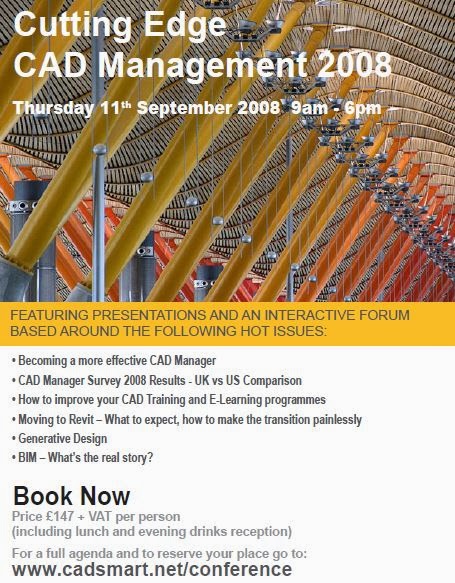
In the same year, we launched our first interactive Revit Architecture skills test and hosted our first AUGI Top DAUG skills contest at AU, in partnership with 4D Technologies. We also presented at the Bentley conference in Philadelphia and attended our first RTC conference in Melbourne, Australia.

By 2009, the global recession was taking hold and AEC firms were turning away from hiring and training in large numbers. This was probably our most challenging year to date. But it also proved to be a turning point on our journey. With BIM adoption gathering pace, we realised that the plug-in technology we had developed was in danger of becoming obsolete. 'The Cloud' beckoned, and with it the ability for firms to customise their test experience and cover a much broader range of test topics. Our original approach of, 'any colour you want (so long as it's black!)' was not going to allow us to grow much further.
As is often the case with technology, our original ideas were being overtaken by the growth of internet technology and the broad range of software being deployed across the AEC industry. One door was closing, but another one was opening... and the KnowledgeSmart brand was born.

Once again, we found ourselves developing new technology from scratch, but we had 6 years of invaluable ideas to build into our new platform. Plus a loyal customer base and extensive network of authors.
In early 2010, the KnowledgeSmart web based test engine was launched. And in the summer of 2010 the original CADsmart software was finally retired from service.
Fast forward 4 years and we arrive at the present day, with a fully developed, interactive, web-based test engine, complete with a customisable library of 60+ software assessments (covering the most popular software products from Autodesk, Bentley, Graphisoft and Adobe) and a customer base numbering in the hundreds of firms, right across the globe.


We can't wait to see what the next 10 years will bring!
R
Wednesday, 20 April 2011
Taking a KS Assessment
It's extremely important for AEC firms to explain to their users precisely why they are being asked to take a technical software skills assessment. The best firms always handle this well. As with all things in life, a little bit of good communication goes a long way.
This is not all about who is the smartest, fastest, or best Revit user. Or the most experienced MicroStation wizard. Although these are useful things to know. The real value in the KS tools is trying to help users, at an individual level, identify what they know and also what they need to brush up on next, in order to improve their skills, with a particular piece of software.
Over the past 8 years, we have facilitated over 20,000 individual test sessions, across hundreds of AEC firms. Experience has shown that, in general, people don't like the idea of taking a test - at least that's usually how they feel at first. However, experience has also shown that, for most people, when they complete their assessment, they realise that it wasn't half as bad as they thought it would be! Further, they often learn new skills as they go through the process of answering the test questions. And lastly, they find the test feedback and coaching notes extremely helpful, in giving them an unbiased appraisal of their skills using a particular software application - relative to their peers in industry. It's important that users have the opportunity to review their test scores and feedback with their team leader or BIM manager. And it's also important that firms explain to their users that all test scores are confidential. Best practice would recommend that only senior administrators should have access to firm-wide results data.
Provided firms explain to their teams that the main point of rolling out an assessment program, is to gather valuable training needs analysis data, rather than a big-brother style exercise in peeking over shoulders, then most users feel OK about the idea. And when firms follow through with more focused, modular training workshops, which target recognised skills gaps, then it's a win-win for users and firms alike.
So let's take a look at the user journey, when asked to complete a KnowledgeSmart skills assessment.
We'll assume the firm has already done the pre-assessment prep - and explained to their teams what is happening and why they are being asked to take an assessment.
The next step is for a user to receive their test invite. (Here is a separate article on how a KS admin sends out test invites: http://the-knowledgesmart-blog.blogspot.com/2011/04/inviting-users-to-take-ks-test.html).
Admins can set up test sessions straight from a browser, but most invites are sent by email. Either way, the user ends up in the same place. Here is a typical KS test invite:

The system assigns a username and password to each user. They access their assessment by clicking the unique URL at the bottom of their invite mail. This takes them to the assessment login page, where they will be prompted to enter their username and password. (If a user loses or forgets their password, they can hit the 'Forgot details?' link to receive a new one).

When they log in, they arrive at the main assessment landing page. Here they will see a summary of the test they are scheduled to take and any special instructions from their administrator.

There are 5 types of questions, which typically comprise a KS assessment. Let's take a brief look at each one..
Free Text
This type of question requires a specific answer, which needs to match the answer stored in the KS database. Look out for precise instructions on how to format your answer, for example, number of decimal places, case sensitive answers, accurate spelling, and so on.

Multiple Choice
Here, you will be offered a selection of possible answers - and you need to select the best one. Watch out for 'distractor' entries, which are designed to make you think before selecting your answer.

Pick List
This question type offers you a range of options, which could represent a correct answer. Choose the best answers from the list provided, using the check boxes, to the left of the answers. Partial marks are often awarded for entering some of the correct answers on pick list questions.

Order List
This question type requires you to place a number of items in the correct sequence. Drag and drop the answer options, until they are in the right order.

True or False
This question type is pretty straightforward! Read the statement or question and decide if you think it is true or false. Enter your answer using the radio buttons.

OK, so when the user arrives at the landing page, before they begin, they need to download the sample data files that they will be using during their assessment. There are a couple of ways they might have to do this. The usual way is to select the orange, 'Download files' button.

This prompts the user to save the files locally on their work station. They will need to navigate back to this folder during their assessment, so most users choose their desktop, or My Documents, etc. The data sets do not need to be saved during a test session, so they can simply be deleted after the assessment has been completed.

Sometimes firms choose to zip up all sample test files and host them locally, on their own servers. If this is the case, then the orange button will not display. Instead, the admin will provide special instructions on the assessment landing page, explaining which file path to follow, in order to find the sample data sets.
Either method is fine - and the user will achieve the same result! They simply need to know which folder to navigate to, in order to access the files for their randomly generated set of test questions.
When they have their sample test files and they have read any other instructions from their administrator, they can hit the green 'Start' button and their assessment will begin.

Each assessment is timed, although the time taken to finish does not impact the overall score. The test user interface (UI) is easy to navigate. All test sessions start on question 1. There is also a small timer, which allows users to keep track of how long they are taking during their session.

Each question has a name and brief summary, which explains to users the main features of the software being addressed.

If a question is task-based, i.e. the user has to use the software in order to answer the question, then the corresponding sample data set can be found in the zip folder they downloaded at the start. The orange instruction box explains where to find the files for each question.

Users can answer the test questions in any order. The 'Question Navigator' allows users to move around the questions and generally familiarise themselves with the exercises. The simple colour code helps users to keep track of their progress. Green squares indicate questions for which an answer has been submitted. Orange represents the current question. Red squares are questions that have yet to be attempted.

If a user makes a mistake, they can re-visit the green squares at any time, to edit their answers. A test session finishes when all the questions have been answered. Users have one last opportunity to review and edit their answers, before hitting the green 'Finish' button, which triggers their assessment to be graded.

 (Sometimes, an admin will set a time limit for an assessment, in which case the session will automatically close after that time has elapsed. Answers submitted will be marked and any questions which have not been attempted will be scored as zero).
When the session is finished, the user may receive a test report, with feedback on any dropped marks. The level of feedback received can vary, depending on the settings prescribed by the account admin.

A helpful summary of the test questions, feedback on incorrect answers, coaching notes and training tags may be viewed by the user, by selecting the 'Show question detail' link at the top of their summary report.

The training tags for questions where score = < 100%, form a personal curriculum of suggested training workshop topics.
R
This is not all about who is the smartest, fastest, or best Revit user. Or the most experienced MicroStation wizard. Although these are useful things to know. The real value in the KS tools is trying to help users, at an individual level, identify what they know and also what they need to brush up on next, in order to improve their skills, with a particular piece of software.
Over the past 8 years, we have facilitated over 20,000 individual test sessions, across hundreds of AEC firms. Experience has shown that, in general, people don't like the idea of taking a test - at least that's usually how they feel at first. However, experience has also shown that, for most people, when they complete their assessment, they realise that it wasn't half as bad as they thought it would be! Further, they often learn new skills as they go through the process of answering the test questions. And lastly, they find the test feedback and coaching notes extremely helpful, in giving them an unbiased appraisal of their skills using a particular software application - relative to their peers in industry. It's important that users have the opportunity to review their test scores and feedback with their team leader or BIM manager. And it's also important that firms explain to their users that all test scores are confidential. Best practice would recommend that only senior administrators should have access to firm-wide results data.
Provided firms explain to their teams that the main point of rolling out an assessment program, is to gather valuable training needs analysis data, rather than a big-brother style exercise in peeking over shoulders, then most users feel OK about the idea. And when firms follow through with more focused, modular training workshops, which target recognised skills gaps, then it's a win-win for users and firms alike.
So let's take a look at the user journey, when asked to complete a KnowledgeSmart skills assessment.
We'll assume the firm has already done the pre-assessment prep - and explained to their teams what is happening and why they are being asked to take an assessment.
The next step is for a user to receive their test invite. (Here is a separate article on how a KS admin sends out test invites: http://the-knowledgesmart-blog.blogspot.com/2011/04/inviting-users-to-take-ks-test.html).
Admins can set up test sessions straight from a browser, but most invites are sent by email. Either way, the user ends up in the same place. Here is a typical KS test invite:

The system assigns a username and password to each user. They access their assessment by clicking the unique URL at the bottom of their invite mail. This takes them to the assessment login page, where they will be prompted to enter their username and password. (If a user loses or forgets their password, they can hit the 'Forgot details?' link to receive a new one).

When they log in, they arrive at the main assessment landing page. Here they will see a summary of the test they are scheduled to take and any special instructions from their administrator.

There are 5 types of questions, which typically comprise a KS assessment. Let's take a brief look at each one..
Free Text
This type of question requires a specific answer, which needs to match the answer stored in the KS database. Look out for precise instructions on how to format your answer, for example, number of decimal places, case sensitive answers, accurate spelling, and so on.

Multiple Choice
Here, you will be offered a selection of possible answers - and you need to select the best one. Watch out for 'distractor' entries, which are designed to make you think before selecting your answer.

Pick List
This question type offers you a range of options, which could represent a correct answer. Choose the best answers from the list provided, using the check boxes, to the left of the answers. Partial marks are often awarded for entering some of the correct answers on pick list questions.

Order List
This question type requires you to place a number of items in the correct sequence. Drag and drop the answer options, until they are in the right order.

True or False
This question type is pretty straightforward! Read the statement or question and decide if you think it is true or false. Enter your answer using the radio buttons.

OK, so when the user arrives at the landing page, before they begin, they need to download the sample data files that they will be using during their assessment. There are a couple of ways they might have to do this. The usual way is to select the orange, 'Download files' button.

This prompts the user to save the files locally on their work station. They will need to navigate back to this folder during their assessment, so most users choose their desktop, or My Documents, etc. The data sets do not need to be saved during a test session, so they can simply be deleted after the assessment has been completed.

Sometimes firms choose to zip up all sample test files and host them locally, on their own servers. If this is the case, then the orange button will not display. Instead, the admin will provide special instructions on the assessment landing page, explaining which file path to follow, in order to find the sample data sets.
Either method is fine - and the user will achieve the same result! They simply need to know which folder to navigate to, in order to access the files for their randomly generated set of test questions.
When they have their sample test files and they have read any other instructions from their administrator, they can hit the green 'Start' button and their assessment will begin.

Each assessment is timed, although the time taken to finish does not impact the overall score. The test user interface (UI) is easy to navigate. All test sessions start on question 1. There is also a small timer, which allows users to keep track of how long they are taking during their session.

Each question has a name and brief summary, which explains to users the main features of the software being addressed.

If a question is task-based, i.e. the user has to use the software in order to answer the question, then the corresponding sample data set can be found in the zip folder they downloaded at the start. The orange instruction box explains where to find the files for each question.

Users can answer the test questions in any order. The 'Question Navigator' allows users to move around the questions and generally familiarise themselves with the exercises. The simple colour code helps users to keep track of their progress. Green squares indicate questions for which an answer has been submitted. Orange represents the current question. Red squares are questions that have yet to be attempted.

If a user makes a mistake, they can re-visit the green squares at any time, to edit their answers. A test session finishes when all the questions have been answered. Users have one last opportunity to review and edit their answers, before hitting the green 'Finish' button, which triggers their assessment to be graded.


When the session is finished, the user may receive a test report, with feedback on any dropped marks. The level of feedback received can vary, depending on the settings prescribed by the account admin.

A helpful summary of the test questions, feedback on incorrect answers, coaching notes and training tags may be viewed by the user, by selecting the 'Show question detail' link at the top of their summary report.

The training tags for questions where score = < 100%, form a personal curriculum of suggested training workshop topics.
R
Thursday, 31 March 2011
KS Test Library Update
It's fair to say that the KS test library is a work in progress. It has also been mentioned (on more than one occasion!) that creating up to date test material for the plethora of design, engineering, modelling, civil, structural, building services and analysis tools used by AEC firms - is a job for life! :)
However, we like a challenge, so ever onwards do we march with our library roadmap!
Progress to date has been very good, with almost 30 test titles currently available to AEC firms, across a range of leading vendors.
Here's an up to date list, as of the end of March:
We also have a pretty hectic 'work in progress' list, with a variety of new modules at various stages of completion.
Here's what's on the drawing board at the moment:
So by the time we get through that little lot, we'll have close to 50 titles in the KS library. Well, that's our goal for the end of 2011, anyway!
In addition, we're seeing quite a bit of activity in customer dashboards, with some high quality custom test material being authored in many AEC firms.
So, that's a quick summary of where things currently stand with our test library. As always, we welcome your comments, feedback and requests for new material. If it isn't on the list, please let us know and we'll make sure it gets added to the workflow.
R
However, we like a challenge, so ever onwards do we march with our library roadmap!
Progress to date has been very good, with almost 30 test titles currently available to AEC firms, across a range of leading vendors.
Here's an up to date list, as of the end of March:
- 3ds Max – modules 1-4
- Adobe InDesign for occasional users
- Adobe Photoshop for occasional users
- AEC Layers Standards – Autodesk
- AutoCAD 2D fundamentals
- AutoCAD 2D – Xpress
- AutoCAD 2D for occasional users
- AutoCAD Civil 3D (part 1)
- AutoCAD Civil 3D (part 2)
- Design Review fundamentals
- Revit Architecture fundamentals
- Revit Architecture – Xpress
- Revit MEP fundamentals (Mechanical)
- Revit MEP fundamentals (Plumbing)
- Revit Structure fundamentals
- Revit Structure – Xpress
- AEC Levels Standards – Bentley
- Bentley Architecture fundamentals
- Bentley GEOPAK (Drainage)
- Bentley InRoads (Roadway Design)
- Bentley View fundamentals
- MicroStation 2D fundamentals
- MicroStation 2D – Xpress
- MicroStation 2D for occasional users
- MicroStation 3D fundamentals
- Rhino fundamentals
We also have a pretty hectic 'work in progress' list, with a variety of new modules at various stages of completion.
Here's what's on the drawing board at the moment:
- Revit Families
- Revit Project Process
- USACE ‘Attachment F’
- Ecotect
- Navisworks Manage
- Revit Architecture 2012 (additional questions)
- Revit MEP fundamentals (Electrical)
- AutoCAD Civil 3D (part 3)
- Revit MEP 2012 (additional questions)
- Google SketchUp
- AutoCAD Architecture
- Revit Structure 2012 (additional questions)
- Bentley ProjectWise
- Bentley Navigator
- MicroStation V8i (Select Series 1-3)
- IES Virtual Environment
- Tekla Structures
- Bricscad
- Codebook
So by the time we get through that little lot, we'll have close to 50 titles in the KS library. Well, that's our goal for the end of 2011, anyway!
In addition, we're seeing quite a bit of activity in customer dashboards, with some high quality custom test material being authored in many AEC firms.
So, that's a quick summary of where things currently stand with our test library. As always, we welcome your comments, feedback and requests for new material. If it isn't on the list, please let us know and we'll make sure it gets added to the workflow.
R
Thursday, 5 August 2010
MCMC 2010
It's that time of year again! One of the year's most enjoyable events takes place on August 10-11; the Mid Continent MicroStation Community User Conference. The venue is once again the excellent Overland Park Convention Center, in Kansas City.
The organisers have pulled out the stops, with an agenda packed full of high-quality speakers, over the course of the two days.
See this link for full details:
http://www.tmcmcmc.org/meetings/2010/Onsite_Agenda_2010.pdf .
Tuesday night's entertainment includes dinner and a repeat trip to Power Play, for another high energy Whirlyball contest. (For the un-initiated, Whirlyball is a mix of lacrosse, basketball - and bumber cars - not for the faint hearted!).
Tickets are just $95 per day, including lunch and snacks throughout the day.
The theme for this conference is Versatility. Covering multiple tracks, including, MicroStation, Civils, Plotting, CAD Management, Collaboration, Building, Structural Analysis and US Army Corps projects.
The organisers have pulled out the stops, with an agenda packed full of high-quality speakers, over the course of the two days.
See this link for full details:
http://www.tmcmcmc.org/meetings/2010/Onsite_Agenda_2010.pdf .
Tuesday night's entertainment includes dinner and a repeat trip to Power Play, for another high energy Whirlyball contest. (For the un-initiated, Whirlyball is a mix of lacrosse, basketball - and bumber cars - not for the faint hearted!).
Tickets are just $95 per day, including lunch and snacks throughout the day.
The theme for this conference is Versatility. Covering multiple tracks, including, MicroStation, Civils, Plotting, CAD Management, Collaboration, Building, Structural Analysis and US Army Corps projects.
Wednesday, 5 May 2010
KnowledgeSmart sponsors Be Together

KnowledgeSmart have signed as Associate sponsors at the Bentley Systems' user conference, Be Together, which takes place in Philadelphia next month.
This is a new format for Bentley, with multiple session tracks, covering a variety of AEC and Infrastructure topics; www.bentley.com/en-US/Community/BE+conference/Agenda.htm.
Sponsors find themselves in new territory this year, in the form of a series of exhibitor 'Zones', each focusing on a different area of technology. These are; Modeling & analysis, Visualization, Intelligent Deliverables, CAD Management, Technology Futures and Knowledge Resources. All zones are linked by the Collaboration zone.
KnowledgeSmart will be featuring our new online skills testing tools for CAD, BIM and Engineering software, situated in the Knowledge Resources zone.
In particular, we'll be presenting tools for skills testing across the following Bentley Systems' products; MicroStation 2D fundamentals, MicroStation for occasional users, MicroStation 3D fundamentals and Bentley Architecture v8i fundamentals, plus a preview of our new Bentley InRoads and Bentley GEOPAK assessments, which go live in the Fall.
Come and say hello to the team, if you're planning to attend. We might even treat you to a Philly Cheesesteak!
Rory
Wednesday, 24 February 2010
KnowledgeSmart goes live
Well, we rolled out the new tools last week and so far, so good! It's a new direction for us in terms of the core approach to skills testing. The new web based platform allows greater flexibility in the way firms can deploy test modules and capture knowledge across a wide range of topics.
We're leaving a beta label on the system for a few more weeks; it's fully operational, but we welcome user feedback on any issues, bugs, missing data sets, or indeed anything that looks like it doesn't belong! Our next priorities are to add some more functionality to the admin dashboard; this includes some content management tools (for when question libraries get to a certain size), some file management tools (for marrying data sets to test questions in a variety of ways) and some general usability items, which have been suggested during pre-launch testing.
In addition, we have a rolling programme of new test material creation. Currently under development include the following libraries; Rhino for Architecture, AutoCAD & MicroStation for occasional users, Bentley Structural Modeller, MicroStation 3D fundamentals, Vectorworks, AEC Revit Standards, Ecotect fundamentals, Bentley InRoads and Civil 3D. These will all be making an appearance over the next few months.
KnowledgeSmart Enterprise customers will automatically see new library modules appear in their dashboard, as soon as they go live. The next challenge is to pull the live test results data into an online skills matrix tool, which administrators can use to display a range of useful metrics. Our intention is for this tool to dovetail into existing intranet environments, feeding into training and project resourcing activity, fully searchable, helping firms to ID the right people, with the right skills, at the right time.
Part of the challenge the new tools present is the variety of options available to admins when deciding just what test types to present to users. In the past, we have provided tests in any colour the customer could choose (so long as they chose black!). Now they really do have choice - and lots of it! The new 'Build Your Own' (BYO) feature enables firms to create their own test material from scratch, using an intuitive online authoring wizard to guide them through the process. AEC firms can capture knowledge across multiple topics, whether that be technical software ability, understanding and adherence to in-house standards, discipline specific knowledge, project-specific information, or indeed anything at all!
On the subject of Standards, we have partnered with the team at Evolve Consultancy to create test content for AEC (UK) CAD Standards for Layers/Levels. Next week, we'll be meeting the team at the US National CAD Standards committee to discuss a skills test for US CAD Standards.
We're running a series of web meetings over the next few weeks, to demonstrate the new system and tools on offer. To book a session, email info@knowledgesmart.net with 'Webinar' in the subject line and we'll schedule you in.
We have an ambitious programme of marketing and promotional activities planned between now and the Summer, both at home and in the US. We're sponsoring the Bentley Community UKI Winter Workshop in Oxford this month (http://www.bentleyuser.org/). We're presenting at the first WAN HR Forum in London on March 18th. And soon after that, we're heading off to Chicago, where we are sponsors at the inaugural KA-Connect knowledge management conference (http://www.ka-connect.com/).
Hope to see you online or in person in the coming weeks!
Rory
We're leaving a beta label on the system for a few more weeks; it's fully operational, but we welcome user feedback on any issues, bugs, missing data sets, or indeed anything that looks like it doesn't belong! Our next priorities are to add some more functionality to the admin dashboard; this includes some content management tools (for when question libraries get to a certain size), some file management tools (for marrying data sets to test questions in a variety of ways) and some general usability items, which have been suggested during pre-launch testing.
In addition, we have a rolling programme of new test material creation. Currently under development include the following libraries; Rhino for Architecture, AutoCAD & MicroStation for occasional users, Bentley Structural Modeller, MicroStation 3D fundamentals, Vectorworks, AEC Revit Standards, Ecotect fundamentals, Bentley InRoads and Civil 3D. These will all be making an appearance over the next few months.
KnowledgeSmart Enterprise customers will automatically see new library modules appear in their dashboard, as soon as they go live. The next challenge is to pull the live test results data into an online skills matrix tool, which administrators can use to display a range of useful metrics. Our intention is for this tool to dovetail into existing intranet environments, feeding into training and project resourcing activity, fully searchable, helping firms to ID the right people, with the right skills, at the right time.
Part of the challenge the new tools present is the variety of options available to admins when deciding just what test types to present to users. In the past, we have provided tests in any colour the customer could choose (so long as they chose black!). Now they really do have choice - and lots of it! The new 'Build Your Own' (BYO) feature enables firms to create their own test material from scratch, using an intuitive online authoring wizard to guide them through the process. AEC firms can capture knowledge across multiple topics, whether that be technical software ability, understanding and adherence to in-house standards, discipline specific knowledge, project-specific information, or indeed anything at all!
On the subject of Standards, we have partnered with the team at Evolve Consultancy to create test content for AEC (UK) CAD Standards for Layers/Levels. Next week, we'll be meeting the team at the US National CAD Standards committee to discuss a skills test for US CAD Standards.
We're running a series of web meetings over the next few weeks, to demonstrate the new system and tools on offer. To book a session, email info@knowledgesmart.net with 'Webinar' in the subject line and we'll schedule you in.
We have an ambitious programme of marketing and promotional activities planned between now and the Summer, both at home and in the US. We're sponsoring the Bentley Community UKI Winter Workshop in Oxford this month (http://www.bentleyuser.org/). We're presenting at the first WAN HR Forum in London on March 18th. And soon after that, we're heading off to Chicago, where we are sponsors at the inaugural KA-Connect knowledge management conference (http://www.ka-connect.com/).
Hope to see you online or in person in the coming weeks!
Rory
Subscribe to:
Posts (Atom)

 Posts
Posts

