
Showing posts with label Branding your test reports. Show all posts
Showing posts with label Branding your test reports. Show all posts
Thursday, 24 May 2018

Saturday, 17 March 2012
KS Help Notes_Settings 03_Branding
ADDING YOUR CORPORATE BRANDING
It is possible to replace the KS logo on all user-facing test UI's and reports, with your own company logo. We recommend that you do this, as it makes the whole experience for users feel more like an in-house training needs analysis exercise, rather than a third party skills test.
Step one
Choose a copy of your company logo. Keep the file size sensible, as it is designed to fit in a comparatively small space, at the top of your admin dashboard, test UI and test reports.
About this size should do just fine:

Step two
Log in to your admin dashboard and select Settings > Branding from your navigation tools.

Step three
Use the browse and upload tools to select your logo and upload a copy to the KS dashboard.

Step 4
Check the boxes to display your logo in 3 places; your KS dashboard, your test UI and your test reports.
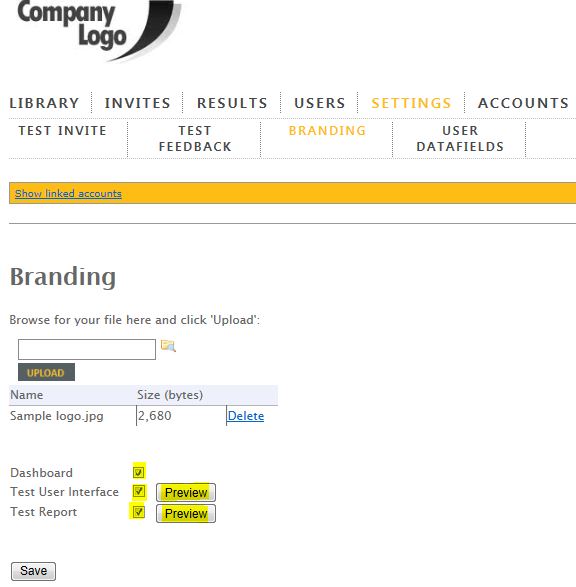
Click the 'Preview' buttons, to view how your logo will display in the test UI and test report.
Sample Test UI

Sample Test Report

Linked Accounts
If you have two or more accounts, you can assign branding changes across multiple accounts at the same time.
Click on the Show linked accounts link in the orange bar.

Select the account(s) you want to be included in your settings update and hit the Save button to register your changes.

R
Wednesday, 30 March 2011
Branding your Test UI and Reports
We recently added a light touch of corporate branding for KS customers.
It is now possible to replace the KS logo on all user-facing test UI's and reports, with your own company logo. We recommend that you do this, as it makes the whole experience for users feel more like an in-house training needs analysis exercise, rather than a scary third party skills test!
It's a really simple process..
Step one
Choose a copy of your company logo. Keep the file size sensible, as it is designed to fit in a comparatively small space, at the top of your admin dashboard, test UI and test reports. About this size should do just fine.

Step two
Log in to your admin dashboard and select Settings > Branding from your navigation tools.

Step three
Use the browse and upload tools to select your logo and upload a copy to the KS dashboard.

Step 4
Check the boxes to display your logo in 3 places; your KS dashboard, your test UI and your test reports.

Click the 'Preview' buttons, to view how your logo will display in the test UI and test report. You'll probably note that we've removed the KS orange colouring from the test reports, replacing it with a more neutral light grey - to avoid any unfortunate clashes with your own colours!


We're gradually dialling back on the KS branding, in favour of your own corporate colours. In future, you'll see a smaller, 'Powered by KnowledgeSmart' logo, appearing at the footer of most of our collateral.

R
It is now possible to replace the KS logo on all user-facing test UI's and reports, with your own company logo. We recommend that you do this, as it makes the whole experience for users feel more like an in-house training needs analysis exercise, rather than a scary third party skills test!
It's a really simple process..
Step one
Choose a copy of your company logo. Keep the file size sensible, as it is designed to fit in a comparatively small space, at the top of your admin dashboard, test UI and test reports. About this size should do just fine.
Step two
Log in to your admin dashboard and select Settings > Branding from your navigation tools.

Step three
Use the browse and upload tools to select your logo and upload a copy to the KS dashboard.

Step 4
Check the boxes to display your logo in 3 places; your KS dashboard, your test UI and your test reports.

Click the 'Preview' buttons, to view how your logo will display in the test UI and test report. You'll probably note that we've removed the KS orange colouring from the test reports, replacing it with a more neutral light grey - to avoid any unfortunate clashes with your own colours!
Sample Test UI

Sample Test Report

We're gradually dialling back on the KS branding, in favour of your own corporate colours. In future, you'll see a smaller, 'Powered by KnowledgeSmart' logo, appearing at the footer of most of our collateral.

R
Subscribe to:
Posts (Atom)

 Posts
Posts

